caronc/apprise
Apprise API - Push Notifications that work with just about every platform!
5M+
caronc/apprise repository overview
Apprise API
Take advantage of Apprise through your network with a user-friendly API.
- Send notifications to more than 150+ services.
- An incredibly lightweight gateway to Apprise.
- A production-ready micro-service at your disposal.
- A simple website to build, verify and test your configuration with.
- An Android app to notify and manage your server from your phone.
Apprise API was designed to easily fit into existing (and new) ecosystems that are looking for a simple notification solution.



Visit the Official Documentation site for more information on the Apprise API.
Screenshots
The built-in Configuration Manager lets you save, review and test your notification setup from any browser:
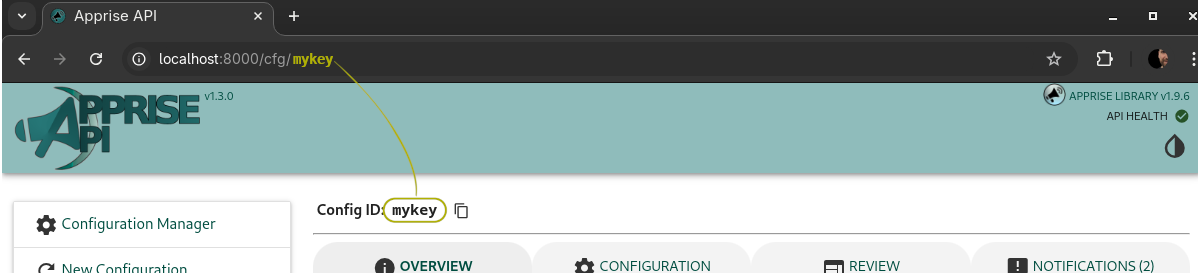
More screenshots: Review · Notifications
Apprise Mobile (Android)
Apprise Mobile is the Android companion app for Apprise API. Send a message, photo, or file to one destination, a group, or every destination you've configured. The app connects to your running Apprise API server; it is not a standalone notification service.
Get Apprise Mobile on Google Play
To connect, open the Configuration Manager in your browser and reveal the Apprise Mobile Quick Setup QR code on any saved configuration. Scanning it from the app adds your server and loads that configuration in one step.
Screenshots: Dashboard · URL Builder · Delivery Report
Visit the Apprise Mobile page for more details, the privacy policy and terms.
Installation
The following options should allow you to access the API at http://localhost:8000/ from your browser.
Docker
# Retrieve container
docker pull caronc/apprise:latest

# Start it up
docker run --name apprise \
   -p 8000:8000 \
   --user "$(id -u):$(id -g)" \
   -v /path/to/local/config:/config \
   -v /path/to/local/plugin:/plugin \
   -v /path/to/local/attach:/attach \
   -e APPRISE_STATEFUL_MODE=simple \
   -e APPRISE_WORKER_COUNT=1 \
   -e APPRISE_DEFAULT_FORMAT=text \
   -e TZ=America/Toronto \
   -d caronc/apprise:latest
/configholds your saved configuration. Persistent storage lives under/config/store, so one volume is enough./pluginis optional and holds your own custom Apprise plugins./attachholds uploaded attachments./tmpholds temporary files and is suitable fortmpfsin hardened deployments.
Docker Compose
services:
  apprise:
    image: caronc/apprise:latest
    container_name: apprise
    ports:
      - "8000:8000"
    environment:
      APPRISE_STATEFUL_MODE: simple
      APPRISE_WORKER_COUNT: "1"
      APPRISE_DEFAULT_FORMAT: "text"
      TZ: America/Toronto
    volumes:
      - ./config:/config
      - ./plugin:/plugin
      - ./attach:/attach
Apprise URLs
📣 To send a notification, you first need one or more Apprise URLs for the services you want to use. Visit https://appriseit.com/services/ to see the ever-growing list.
API Details
Health Checks
| Path | Method | Description |
|---|---|---|
/status | GET | Returns 200 when the server is healthy and 417 when there is a problem. Set Accept to application/json or text/plain for the output you prefer. |
Stateless Solution
| Path | Method | Description |
|---|---|---|
/notify/ | POST | Sends notifications to the urls in the payload, or to APPRISE_STATELESS_URLS when none are given. |
Persistent (Stateful) Storage Solution
| Path | Method | Description |
|---|---|---|
/add/{KEY} | POST | Saves Apprise configuration (config + format) or a set of urls. |
/del/{KEY} | POST | Removes the configuration (and its login). |
/move/{KEY} | POST | Moves the configuration to a new Config ID given in to. |
/get/{KEY} | POST | Returns the saved configuration. Works directly with the Apprise CLI and AppriseConfig(). Alias: /cfg/{KEY}. |
/notify/{KEY} | POST | Sends notifications through the saved configuration. Use tag to pick destinations. |
/json/urls/{KEY} | GET | Returns the URLs and tags saved under the key. |
/status/{KEY} | GET | Returns /status, protected by the key's credentials. |
/auth/{KEY} | GET/POST/DELETE | Views, sets or removes the key's login and access mode. |
Other Endpoints
| Path | Method | Description |
|---|---|---|
/details | GET | Lists every supported Apprise service (use Accept: application/json). |
/metrics | GET | Prometheus endpoint for basic metrics. |
Notification Payload
Both /notify/ and /notify/{KEY} accept form or JSON payloads:
- body: Your message. Optional when an attachment is provided.
- title: An optional title.
- type:
info,success,warningorfailure. Defaults toinfo. - format:
text,markdownorhtml. - tag: Select saved destinations by tag (stateful only).
- attach: One or more files or web URLs to attach.
- template: Values for a saved YAML configuration written with
${NAME}markers (stateful only).
Add ?stream=yes (or Accept: text/event-stream) to watch delivery progress live.
Example Usage
# Stateless notification
curl -X POST -d 'urls=mailto://user:[email protected]&body=test message' \
    http://localhost:8000/notify

# Stateless notification using JSON
curl -X POST -H "Content-Type: application/json" \
    -d '{"urls": "mailto://user:[email protected]", "body":"test message"}' \
    http://localhost:8000/notify

# Stateful notification via {KEY}
curl -X POST -d "body=test message" http://localhost:8000/notify/abc123

# Notify only destinations tagged devops
curl -X POST -d 'tag=devops&body=test message' \
    http://localhost:8000/notify/abc123

# Send an attachment
curl -X POST -F 'body=test message' -F [email protected] \
    http://localhost:8000/notify/abc123

# Keep the Config ID out of the URL
curl -X POST -H "X-Apprise-Config-ID: abc123" \
    -d "body=test message" http://localhost:8000/notify
Authentication
Apprise API can protect its endpoints with HTTP Basic Auth:
docker run --name apprise \
   -p 8000:8000 \
   -v /path/to/local/config:/config \
   -e APPRISE_AUTH_REQUIRED=yes \
   -e APPRISE_USER=admin \
   -e APPRISE_PASSWORD=your-password-here \
   -d caronc/apprise:latest
- The administrator can access and manage every Config ID.
- Each Config ID can have its own login, so people only reach their own configuration.
- Each Config ID has an access mode:
user,locked,publicordisabled.lockedandpublicrequire a specific tag when notifying. - Only
useraccess may send stateless notifications, and it must pass itsX-Apprise-Config-IDheader.
See the Authentication section for the full details.
Environment Variables
Below are the most common settings. See the full list for everything else (storage, pruning, streaming, Kubernetes and nginx overrides).
| Variable | Description |
|---|---|
APPRISE_STATEFUL_MODE | hash (default), simple (one plain file per Config ID in /config) or disabled. |
APPRISE_STATELESS_MODE | enabled (default) or disabled. |
APPRISE_STATELESS_URLS | Default URLs for /notify/ calls that do not provide any. |
APPRISE_CONFIG_LOCK | Set to yes to hide configuration content and management from everyone except an authenticated administrator. |
APPRISE_AUTH_REQUIRED | Set to yes to enable Basic Auth. Defaults to no. |
APPRISE_USER / APPRISE_PASSWORD | The administrator login (used with APPRISE_AUTH_REQUIRED=yes). |
APPRISE_TRUSTED_ORIGINS | Comma separated origins allowed to make browser writes, such as https://apprise.example.com. Set this for HTTPS deployments. |
APPRISE_DEFAULT_FORMAT | text, html or markdown for requests that do not set format. |
APPRISE_DEFAULT_CONFIG_ID | The Config ID the website opens by default. Defaults to apprise. |
APPRISE_ADMIN | Shows the configuration list in simple mode. Defaults to yes. |
APPRISE_API_ONLY | Set to yes to turn off the website and keep only the API. |
APPRISE_ALLOW_TEMPLATES | Set to no to turn off ${NAME} template support. Defaults to yes. |
APPRISE_TEMPLATE_<NAME> | Fallback value for a ${NAME} marker in saved YAML configuration. |
APPRISE_ATTACH_SIZE | Maximum attachment size in MB. Defaults to 200 (max 500). |
APPRISE_ALLOW_SERVICES / APPRISE_DENY_SERVICES | Limit which Apprise services may be used. |
APPRISE_WEBHOOK_URL | A URL Apprise posts results to after each notification. |
APPRISE_WORKER_COUNT | Number of workers. Defaults to (2 * CPUs) + 1. |
APPRISE_WORKER_TIMEOUT | Worker timeout in seconds. Defaults to 300. |
APPRISE_BASE_URL | The subpath to use when hosting behind a proxy. |
APPRISE_DEFAULT_THEME | light (default) or dark. |
TZ | Your timezone, such as America/Toronto. |
Apprise Integration
Apprise CLI
apprise -vv --body="test message" \
   --config=http://localhost:8000/get/{KEY}
Python
import apprise

# Point our configuration to this API server
config = apprise.AppriseConfig()
config.add('http://localhost:8000/get/{KEY}')

# Create our Apprise instance and send a test message
a = apprise.Apprise()
a.add(config)
a.notify('test message')
For webhooks, custom plugins, Kubernetes, live streaming and the complete API reference, visit the Apprise API Repository and the Official Documentation.
Tag summary
Content type
Image
Digest
sha256:cc5ef662a…
Size
115.8 MB
Last updated
6 days ago
docker pull caronc/apprise