jkaninda/simple-api
A simple REST API with Redis database built with Spring boot to learn Docker and Kubernetes
4.9K
jkaninda/simple-api repository overview
Simple API Documentation
A simple REST API application built with Spring Boot and Redis, it serves as a learning platform for Docker and Kubernetes concepts. This project covers a wide range of topics, including microservices architecture, containerization, and API management.
Learning Topics
Core Concepts
- Spring Boot REST API
- Spring Boot Scheduler
- REST API HTTP Status Codes
- Microservices Architecture
- Microservices Communication
- Microservices Caching System
- Application Logging
- Application Scaling
- Application Health Checks
- Application Monitoring
Monitoring & Visualization
- Grafana
- Prometheus
API Management
- API Gateway Management
- HTTP Caching & Rate Limiting
- Load Balancing
Docker
- Docker Services
- Docker Networks
- Docker Volumes
- Docker Container Communication
- Docker Container Health Checks
- Docker Image Build
- Docker Rootless Containers
Kubernetes
- Kubernetes Pods
- Kubernetes Deployments
- Kubernetes Services
- Kubernetes ConfigMap
- Kubernetes Volumes
- Kubernetes Rootless Pods
- Kubernetes Ingress
Links
Table of Contents
- API Documentation
- Running the Application
- Build Docker Image
- Run on Kubernetes
- Deploy with Monitoring
- Advanced Deployment
- Scalability
- Ingress Configuration
- Run as Non-Root User
- Health Checks and Security Context
- Install with Helm
API Documentation
Base Endpoint
- Endpoint:
/ - Method:
GET - Response:
  {
    "success": true,
    "code": 200,
    "message": "OK",
    "error": null,
    "data": "Hello from Simple API, everything is ok"
  }
Books Endpoints
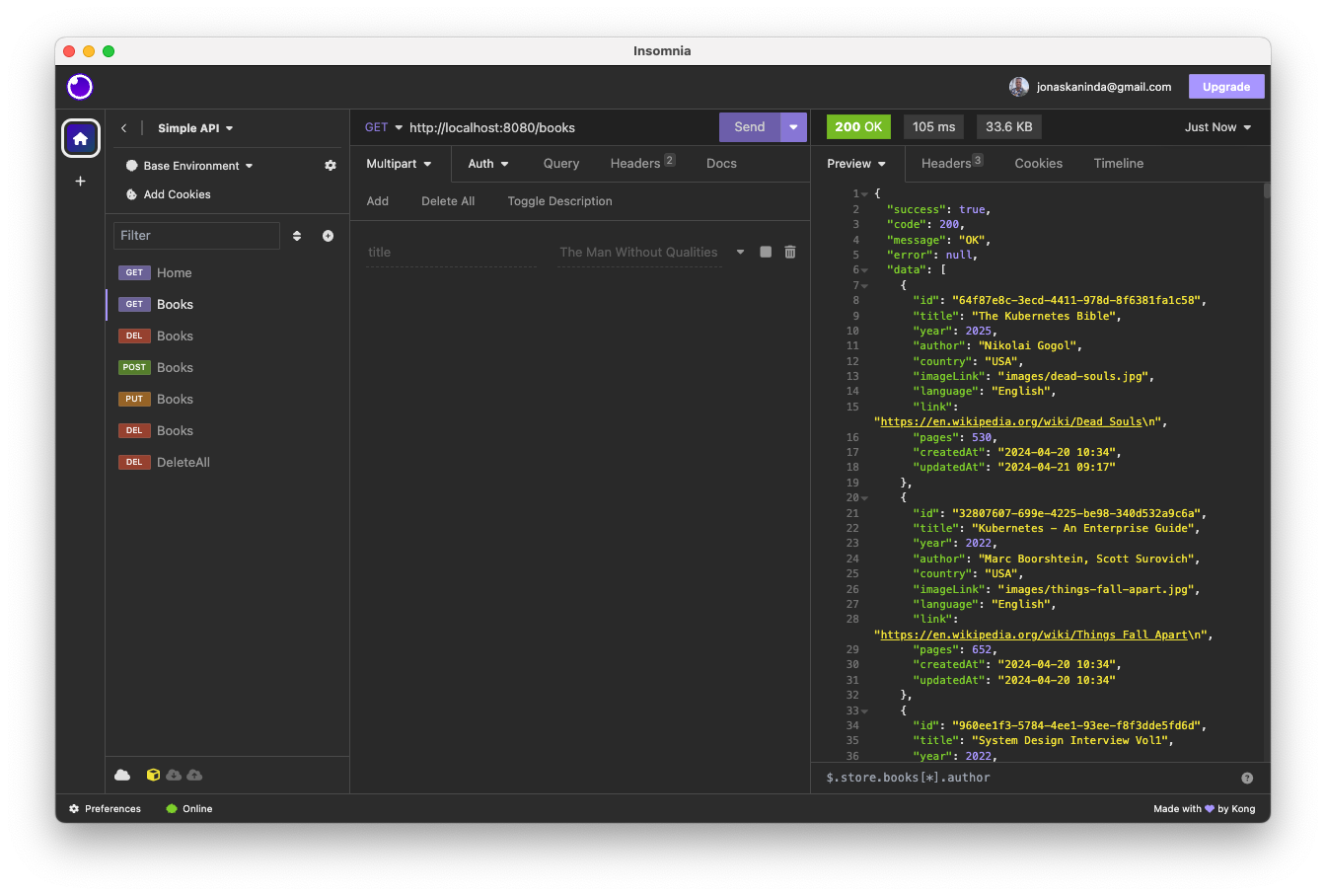
Get All Books
-
Endpoint:
/books -
Method:
GET -
Response:
{
  "success": true,
  "code": 200,
  "message": "OK",
  "error": null,
  "data": [
    {
      "title": "The Kubernetes Bible",
      "author": "Nassim Kebbani, Piotr Tylenda",
      "country": "USA",
      "imageLink": "images/things-fall-apart.jpg",
      "language": "English",
      "link": "https://en.wikipedia.org/wiki/Things_Fall_Apart\n",
      "pages": 652,
      "year": 2022,
      "createdAt": "2024-04-20 10:34",
      "updatedAt": "2024-04-20 10:34"
    },
    {
      "title": "Kubernetes - An Enterprise Guide",
      "author": "Marc Boorshtein, Scott Surovich",
      "country": "USA",
      "imageLink": "images/things-fall-apart.jpg",
      "language": "English",
      "link": "https://en.wikipedia.org/wiki/Things_Fall_Apart\n",
      "pages": 652,
      "year": 2022,
      "createdAt": "2024-04-20 10:34",
      "updatedAt": "2024-04-20 10:34"
    }
  ]
}
Create a New Book
-
Endpoint:
/books -
Method:
POST -
Request Body:
{
  "title": "The Kubernetes Bible",
  "author": "Nassim Kebbani, Piotr Tylenda",
  "country": "USA",
  "imageLink": "images/things-fall-apart.jpg",
  "language": "English",
  "link": "https://en.wikipedia.org/wiki/Things_Fall_Apart\n",
  "pages": 652,
  "year": 2022
}
Update a Book
-
Endpoint:
/books/{id} -
Method:
PUT -
Request Body:
{
  "title": "The Kubernetes Bible",
  "author": "Nassim Kebbani, Piotr Tylenda",
  "country": "USA",
  "imageLink": "images/things-fall-apart.jpg",
  "language": "English",
  "link": "https://en.wikipedia.org/wiki/Things_Fall_Apart\n",
  "pages": 652,
  "year": 2022
}
Get Book by ID
-
Endpoint:
/books/{id} -
Method:
GET -
Response:
{
  "success": true,
  "code": 200,
  "message": "OK",
  "error": null,
  "data": {
    "title": "The Kubernetes Bible",
    "author": "Nassim Kebbani, Piotr Tylenda",
    "country": "USA",
    "imageLink": "images/things-fall-apart.jpg",
    "language": "English",
    "link": "https://en.wikipedia.org/wiki/Things_Fall_Apart\n",
    "pages": 652,
    "year": 2022
  }
}
Delete Book by ID
- Endpoint:
/books/{id} - Method:
DELETE
Delete All Books
- Endpoint:
/deleteAll - Method:
DELETE - Note: Restart the application with
RUN_DATA_SEED=trueto restore predefined data.
Version Endpoint
- Endpoint:
/version - Method:
GET - Response: Returns the API version.
Running the Application
Prerequisites
- Docker Desktop installed (Download Docker Desktop)
Basic Docker Deployment
-
Create a Docker Network:
docker network create web -
Deploy the Simple API:
-
Create a
compose.yamlfile with the following content:services: simple-api: container_name: simple-api image: jkaninda/simple-api:latest restart: unless-stopped ports: - "8080:8080" networks: - web networks: web: external: true name: web -
Run the following command:
docker compose up -d
-
Advanced Docker Deployment
-
Deploy with Redis:
-
Update the
compose.yamlfile:services: simple-api: container_name: simple-api image: jkaninda/simple-api:latest restart: unless-stopped environment: - SPRING_DATA_REDIS_HOST=redis - SPRING_DATA_REDIS_PORT=6379 - SPRING_DATA_REDIS_TIMEOUT=60000 - SPRING_DATA_REDIS_PASSWORD=password - RUN_DATA_SEED=true ports: - "8080:8080" networks: - web redis: image: redis:alpine container_name: redis restart: unless-stopped command: redis-server --appendonly yes --requirepass password expose: - 6379 volumes: - ./redis:/data networks: - web networks: web: external: true name: web -
Run the deployment:
docker compose up -d
-
-
Environment Variables from a File:
-
Create a
simple-api.envfile:SPRING_DATA_REDIS_HOST=redis SPRING_DATA_REDIS_PORT=6379 SPRING_DATA_REDIS_TIMEOUT=60000 SPRING_DATA_REDIS_PASSWORD=password RUN_DATA_SEED=true -
Update the
compose.yamlfile to use the environment file:services: simple-api: container_name: simple-api image: jkaninda/simple-api:latest restart: unless-stopped env_file: - simple-api.env ports: - "8080:8080" networks: - web redis: image: redis:alpine container_name: redis restart: unless-stopped command: redis-server --appendonly yes --requirepass "${SPRING_DATA_REDIS_PASSWORD}" env_file: - simple-api.env expose: - 6379 volumes: - ./redis:/data networks: - web networks: web: external: true name: web
-
-
Docker Container Health Check:
-
Add a health check to the
compose.yamlfile:healthcheck: test: wget --no-verbose --tries=1 --spider http://localhost:8080/internal/health/live || exit 1
-
Deploy with Monitoring
Docker Compose Setup
-
Create Configuration Files
-
config/datasources.yamlapiVersion: 1 datasources: - name: Prometheus type: prometheus access: proxy url: http://prometheus:9090 isDefault: true -
config/prometheus.yamlglobal: scrape_interval: 15s evaluation_interval: 15s scrape_configs: - job_name: "simple-api" metrics_path: '/actuator/prometheus' static_configs: - targets: ["simple-api:8080"] labels: application: 'Simple API'
-
-
Create
compose.yamlservices: simple-api: image: jkaninda/simple-api:latest restart: unless-stopped env_file: - simple-api.env ports: - "8080:8080" healthcheck: test: wget --no-verbose --tries=1 --spider http://localhost:8080/internal/health/live || exit 1 networks: - web redis: image: redis:alpine restart: unless-stopped command: redis-server --appendonly yes --requirepass "${SPRING_DATA_REDIS_PASSWORD}" env_file: - simple-api.env volumes: - ./redis:/data networks: - web prometheus: image: prom/prometheus:v2.52.0 volumes: - ./config/prometheus.yml:/etc/prometheus/prometheus.yml - ./prometheus:/prometheus networks: - web grafana: image: grafana/grafana:11.0.0 ports: - "3000:3000" volumes: - ./config/datasources.yaml:/etc/grafana/provisioning/datasources/datasources.yaml - ./grafana:/var/lib/grafana networks: - web networks: web: external: true name: web -
Start Services
docker-compose up -d -
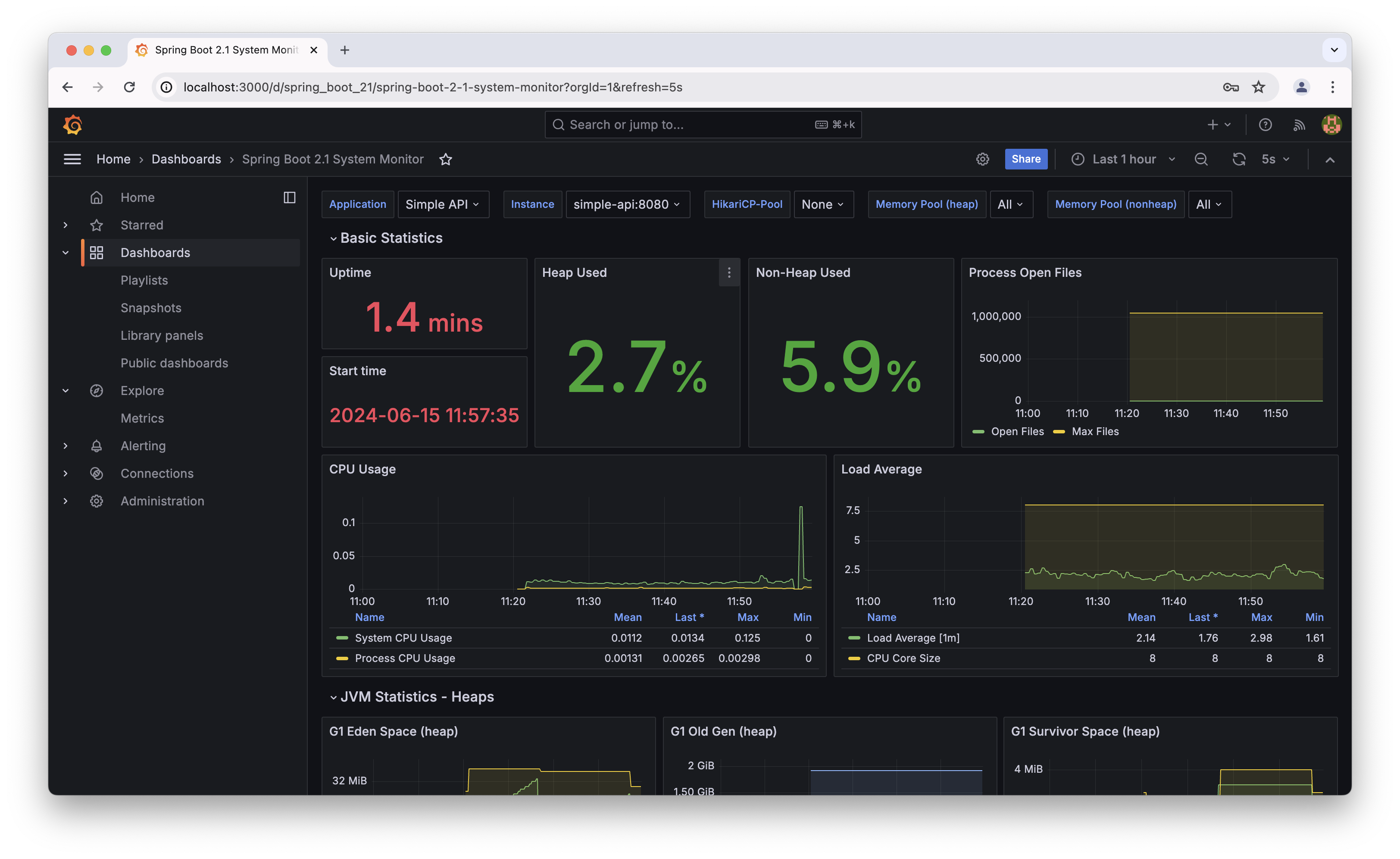
Access Grafana
- Open
http://localhost:3000in your browser. - Use default credentials:
admin/admin. - Import Spring Boot Grafana dashboard using ID
11378.
- Open
API Gateway Deployment
We will use an API Gateway to secure and optimize our API by integrating key features such as rate limiting, HTTP caching, and load balancing.
Goma Gateway Overview
Goma Gateway is a lightweight, high-performance, declarative API Gateway management tool with a robust set of middleware capabilities.
Key Features of Goma Gateway
- Authorization Middleware: Control access to your APIs.
- HTTP Caching: Improve performance by caching responses.
- Rate Limiting: Protect your APIs from abuse by limiting the number of requests.
- HTTP Methods Limit: Restrict access to specific HTTP methods.
- Load Balancing: Distribute traffic across multiple instances.
- Cross-Origin Resource Sharing (CORS): Enable or restrict cross-origin requests.
- Backend Errors Interceptor: Handle and transform backend errors gracefully.
- Block Common Exploits Middleware: Safeguard against common vulnerabilities.
- Additional Features: Goma Gateway includes several other powerful tools to optimize and secure your APIs.
Example Deployment: Simple API with Goma Gateway
In this example, we will deploy a simple API with three instances running behind Goma Gateway. Authentication will also be enabled.
Steps to Deploy
Create the Configuration File:
- Create a file named goma-config.yml in the config folder.
- Copy and paste the following configuration:
version: 2
gateway:
  writeTimeout: 15
  readTimeout: 15
  idleTimeout: 30
  logLevel: ""
  extraConfig:
    directory: /etc/goma/extra
    watch: false
  routes:
    - path: /
      name: simple-api
      disabled: false
      hosts: []
      cors:
        origins:
          - http://localhost:3000
        headers:
          Access-Control-Allow-Credentials: "true"
          Access-Control-Allow-Headers: Origin, Authorization
          Access-Control-Max-Age: "1728000"
      rewrite: ''
      methods: []
      backends:
        - endpoint: http://simple-api:8080
          weight: 5
        - endpoint: http://simple-api2:8080
          weight: 2
        - endpoint: http://simple-api3:8080
          weight: 1
      healthCheck:
        path: /internal/health/live
        interval: 30s
        timeout: 10s
        healthyStatuses:
          - 200
          - 404
      # Intercept backend error
      errorInterceptor:
        enabled: true
        contentType: application/json
        # Customize error response
        errors:
          - status: 404
            body: '{"error": "404 Not Found"}'
          - status: 500
            body: '{"error": "Internal Server Error"}'
      middlewares:
        #-  access-policy
       # - basic-auth
       # - block-access
        - rate-limit
middlewares:
  - name: basic-auth
    type: basic
    paths:
      - /*
    rule:
      realm: Restricted
      users:
        - admin:$2y$05$TIx7l8sJWvMFXw4n0GbkQuOhemPQOormacQC4W1p28TOVzJtx.XpO
        - admin:admin
  - name: block-access
    type: access
    paths:
      - /swagger-ui/*
      - /api-docs/*
      - /actuator/*
    rule:
      statusCode: 404
  - name: rate-limit
    type: rateLimit
    rule:
      unit: minute
      requestsPerUnit: 30
  - name: access-policy
    type: accessPolicy
    rule:
      action: DENY
      sourceRanges:
        - 10.1.10.0/16
        - 192.168.1.25-192.168.1.100
        - 192.168.1.115
- Update
compose.yamlfor API Gateway:-
Add the following services:
services:
  api-gateway:
    image: jkaninda/goma-gateway
    container_name: api-gateway
    command: server -c /etc/goma/goma-config.yml
    restart: always
    volumes:
      - ./config:/etc/goma
    ports:
      - "8080:8080"
      - "843:8443"
    networks:
      - web
  simple-api:
    container_name: simple-api
    image: jkaninda/simple-api:latest
    restart: unless-stopped
    env_file:
      - simple-api.env
    networks:
      - web
  simple-api2:
    container_name: simple-api2
    image: jkaninda/simple-api:latest
    restart: unless-stopped
    env_file:
      - simple-api.env
    networks:
      - web
  simple-api3:
    container_name: simple-api3
    image: jkaninda/simple-api:latest
    restart: unless-stopped
    env_file:
      - simple-api.env
    networks:
      - web
  redis:
    image: redis:alpine
    container_name: redis
    restart: unless-stopped
    command: redis-server --appendonly yes --requirepass "${SPRING_DATA_REDIS_PASSWORD}"
    env_file:
      - simple-api.env
    expose:
      - 6379
    volumes:
      - redis:/data
    networks:
      - web
volumes:
  redis:
networks:
  web:
    external: true
    name: web
-
Additional Resources
For more detailed instructions and advanced configurations, explore the official documentation:
Goma Gateway Documentation
Build Docker Image
Dockerfile
# Build Stage
FROM maven:3.8.7-amazoncorretto-17 AS MAVEN_TOOL_CHAIN
WORKDIR /tmp/
COPY pom.xml /tmp/pom.xml
COPY src /tmp/src/
RUN mvn clean package -B

# Runtime Stage
FROM amazoncorretto:17-alpine3.19-jdk
ENV VERSION="1.0"
LABEL author="Jonas Kaninda"
LABEL github="https://github.com/jkaninda/simple-api"
ARG JAR_FILE=target/*.jar

# Copy from build stage
COPY --from=MAVEN_TOOL_CHAIN /tmp/$JAR_FILE /App/api.jar
COPY ./data /data

EXPOSE 8080
ENTRYPOINT ["java", "-jar", "/App/api.jar"]
Build the Docker Image
docker build -f docker/Dockerfile -t jkaninda/simple-api:latest .
Run on Kubernetes
Prerequisites
- Install Kind for local Kubernetes cluster setup.
- Install
kubectlfor Kubernetes management.
Create a Kubernetes Cluster with Kind
cat <<EOF | kind create cluster --config=-
kind: Cluster
apiVersion: kind.x-k8s.io/v1alpha4
nodes:
- role: control-plane
  kubeadmConfigPatches:
  - |
    kind: InitConfiguration
    nodeRegistration:
      kubeletExtraArgs:
        node-labels: "ingress-ready=true"
  extraPortMappings:
  - containerPort: 80
    hostPort: 80
    protocol: TCP
  - containerPort: 443
    hostPort: 443
    protocol: TCP
EOF
Deploy Simple API
-
Create Namespace
kubectl create namespace simple-api -
Deploy Simple API
cat <<EOF | kubectl apply -f - apiVersion: apps/v1 kind: Deployment metadata: name: simple-api namespace: simple-api spec: replicas: 1 selector: matchLabels: app: simple-api template: metadata: labels: app: simple-api spec: containers: - name: simple-api image: jkaninda/simple-api:latest resources: limits: memory: "750Mi" cpu: "500m" ports: - containerPort: 8080 EOF -
Create Service
cat <<EOF | kubectl apply -f - apiVersion: v1 kind: Service metadata: name: simple-api-svc namespace: simple-api spec: selector: app: simple-api ports: - port: 8080 targetPort: 8080 EOF -
Verify Deployment
kubectl -n simple-api get all
Advanced Deployment
Health Checks and Security Context
apiVersion: apps/v1
kind: Deployment
metadata:
  name: simple-api
  namespace: simple-api
spec:
  replicas: 1
  selector:
    matchLabels:
      app: simple-api
  template:
    metadata:
      labels:
        app: simple-api
    spec:
      securityContext:
        runAsUser: 1000
        runAsGroup: 1000
      containers:
        - name: simple-api
          image: jkaninda/simple-api:rootless
          envFrom:
            - configMapRef:
                name: simple-api
          readinessProbe:
            httpGet:
              path: /internal/health/ready
              port: 8080
            initialDelaySeconds: 30
            periodSeconds: 10
            timeoutSeconds: 10
          livenessProbe:
            httpGet:
              path: /internal/health/live
              port: 8080
            initialDelaySeconds: 60
            periodSeconds: 30
            timeoutSeconds: 10
          resources:
            limits:
              memory: "750Mi"
              cpu: "500m"
          ports:
            - containerPort: 8080
Scalability
Scale the API deployment to handle increased traffic:
kubectl -n simple-api scale deployment/simple-api --replicas 2
Ingress Configuration
apiVersion: networking.k8s.io/v1
kind: Ingress
metadata:
  name: simple-api-ingress
  namespace: simple-api
spec:
  rules:
    - host: simple-api.localhost
      http:
        paths:
          - path: /
            pathType: Prefix
            backend:
              service:
                name: simple-api-svc
                port:
                  number: 8080
Run as Non-Root User
To run the pod as a non-root user, use the rootless image tag:
kubectl apply -f - <<EOF
apiVersion: apps/v1
kind: Deployment
metadata:
  name: simple-api
  namespace: simple-api
spec:
  replicas: 1
  selector:
    matchLabels:
      app: simple-api
  template:
    metadata:
      labels:
        app: simple-api
    spec:
      containers:
      - name: simple-api
        image: jkaninda/simple-api:rootless
        resources:
          limits:
            memory: "750Mi"
            cpu: "500m"
        ports:
        - containerPort: 8080
EOF
Install with Helm
Install Simple API
helm install simple-api oci://registry-1.docker.io/jkaninda/simple-api --version 0.1.1
Install Monitoring Stack
helm install monitoring oci://registry-1.docker.io/jkaninda/monitoring --version 0.1.0
Screenshots
-
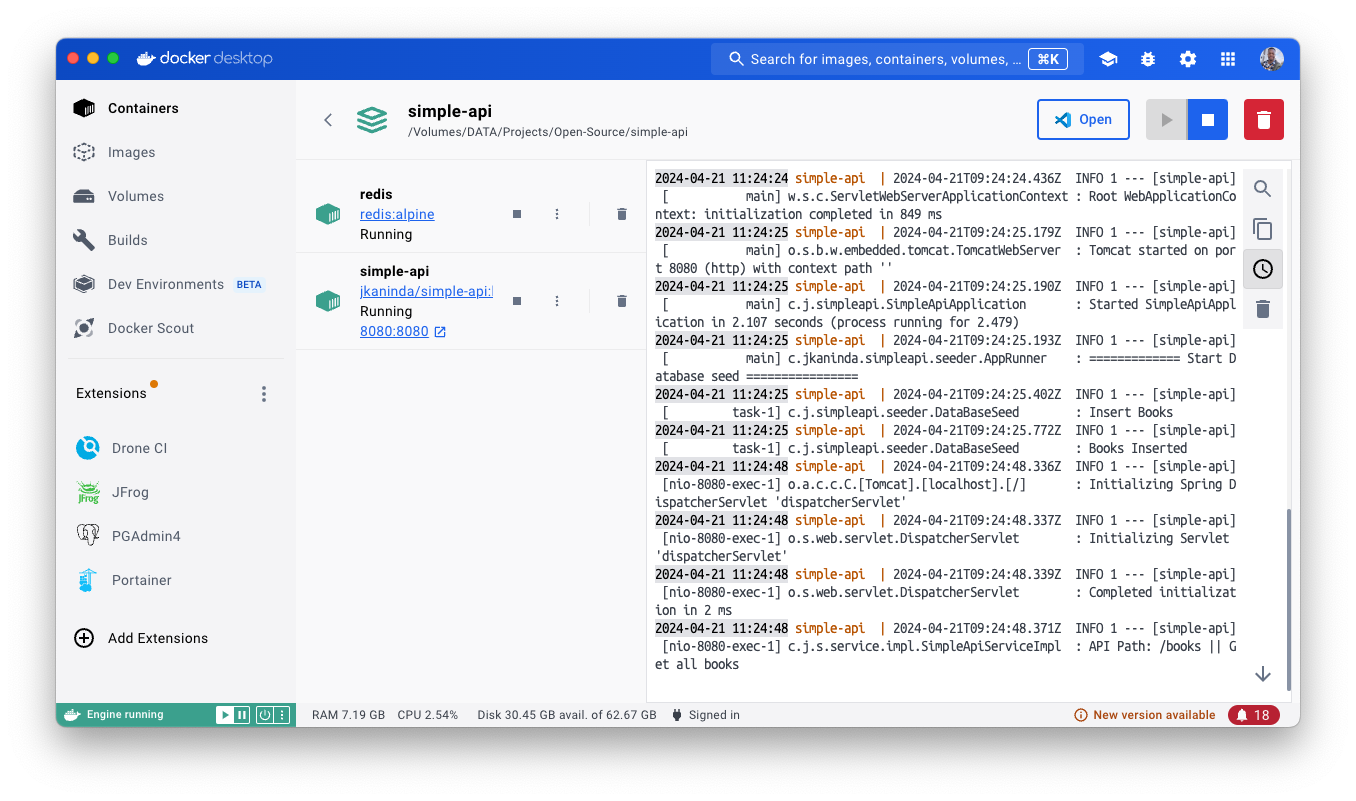
Docker:
-
Insomnia:
-
Grafana:
Tag summary
Content type
Image
Digest
sha256:ce4122d4c…
Size
172.5 MB
Last updated
over 2 years ago
docker pull jkaninda/simple-api