stefanoimperiale/telethon_downloader
Enhanced Telegram Bot on a Telethon client for auto downloads based on rodriguezst downloader
3.2K
stefanoimperiale/telethon_downloader repository overview
Telethon Downloader

Find us at:


stefanoimperiale/telethon_downloader
This project is intent to be an evolution of jsavargas/telethon_downloader
Telegram Bot on a Telethon client that auto downloads incoming media files. Additional features include:
- Downloading YouTube videos
- Select the final destination of the downloaded files
- Create a new folder when downloading a new file
- Show the download progress, speed and ETA in the Telegram chat
- Subscribe to a Telegram channel or group and download new files automatically as soon as they are posted (required login with a Telegram account)
- Multiple Telegram accounts supported in the same instance (if preauthorized)
- Login integrated in the Telegram chat (no need to use the command line only if you don't have 2FA enabled, otherwise see #2)
- Bulk destination folder selection
- Bulk download of all files in a Telegram chat
- Parallel downloads
- Download file or a directory inside your mapped volume in the telegram chat
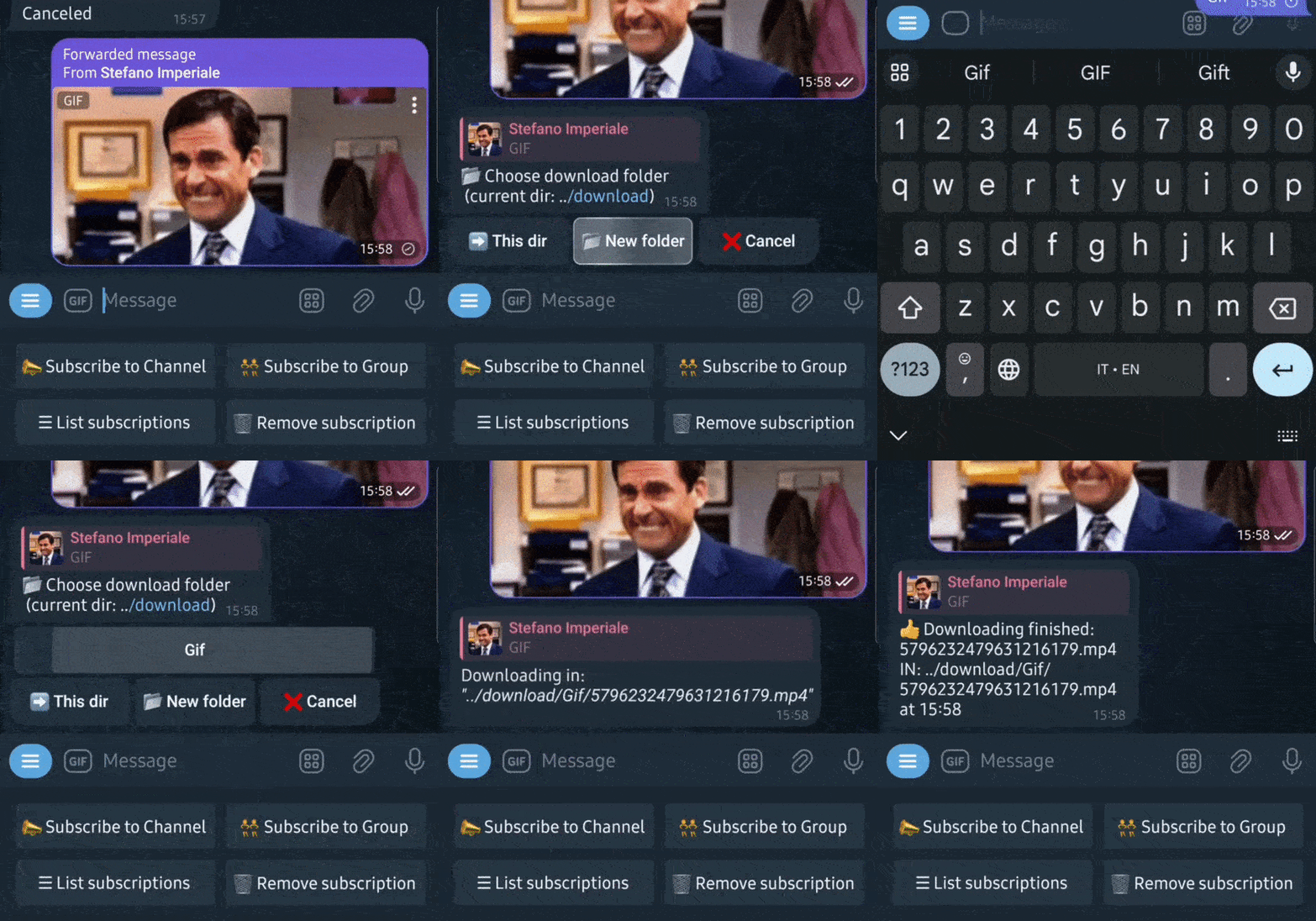

Running Telethon Downloader
Commands
\help: show the help message
\subscribe: subscribe to a channel or group
\version: show the current version
\newfolder: create a new folder in the selected position
\id: show your current telegram ID
\download: download a file or a folder content in your bot chat
\login: login with a Telegram account (required for the subscription feature)
Environment:
Pull or build the docker image and launch it with the following environment variables:
| Environment | Function | Default Value |
|---|---|---|
TG_AUTHORIZED_USER_ID | ID of authorized users | [REQUIRED] |
TG_API_ID | telegram API key generated at ´Generating Telegram API keys´ | [REQUIRED] |
TG_API_HASH | telegram API hash generated at ´Generating Telegram API keys´ | [REQUIRED] |
TG_BOT_TOKEN | telegram BOT token generated at ´Creating a Telegram Bot´ | [REQUIRED] |
TG_CONFIG_PATH | directory where save all relevant configuration files.. | /config |
TG_DOWNLOAD_PATH | root directory to show on folder selection | /download |
TG_DOWNLOAD_PATH_TORRENTS | folder where torrent files are downloaded where transmission will upload them | /watch |
YOUTUBE_LINKS_SUPPORTED | list of supported youtube links comma divided | youtube.com,youtu.be |
YOUTUBE_FORMAT | select the format to save a youtube video (default to bestvideo+bestaudio/best) | bestvideo+bestaudio/best |
TG_UNZIP_TORRENTS | whether or not to unzip a torrent file if is in .zip format | False |
TG_PROGRESS_DOWNLOAD | whether or not to show the progress information for a download | True |
TG_ALLOWED_PHOTO | if True pictures are allowed to be downloaded too | False |
TG_MAX_PARALLEL | how many parallel download will be at the same time | 4 |
TG_DL_TIMEOUT | maximum time (in seconds) to wait for a download to complete. after this time the download is cancelled and an error is triggered | 7200 |
In addition to the above, you can also set the following optional environment variables inherited from LinuxServer.io's ffmpeg BaseImage:
| Environment | Function |
|---|---|
PUID=1000 | for UserID - see below for explanation |
PGID=1000 | for GroupID - see below for explanation |
TZ=Etc/UTC | specify a timezone to use, see this list. |
docker-compose
version: '3'
services:
  telethon_downloader:
    image: stefanoimperiale/telethon_downloader
    container_name: telethon_downloader
    restart: unless-stopped
    environment:
      - 'PUID=1000'
      - 'PGID=1000'
      - 'TG_AUTHORIZED_USER_ID=63460,645261' #<telegram chat_id authorized>
      - 'TG_API_ID=<telegram API key generated at ´Generating Telegram API keys´>'
      - 'TG_API_HASH=<telegram API hash generated at ´Generating Telegram API keys´>'
      - 'TG_BOT_TOKEN=<telegram BOT token generated at ´Creating a Telegram Bot´>'
      - 'TG_PROGRESS_DOWNLOAD=True'
      - 'TZ=Europe/Rome'
    volumes:
      - /path/to/config:/config
      - /path/to/download/torrent/watch:/watch
      - /path/to/download:/download
Volumes:
/config : folder where save all relevant configuration files
/download : folder where files are downloaded
/watch : folder where torrent files are downloaded where transmission will upload them
2FA Login
In order to use the subscription feature you need to login with a Telegram account. If you have 2FA enabled you need to login with the command line. To do so, run the following command before starting the container:
docker compose run --rm --entrypoint= telethon_downloader python3 client-setup.py
This will ask you for your phone number and then for the code you received on Telegram with your password. After that you can use the subscription feature.
Supported Architectures (LinuxServer.io)
We utilise the docker manifest for multi-platform awareness. More information is available from docker here and our announcement here.
Simply pulling stefanoimperiale/telethon_downloader:latest should retrieve the correct image for your arch, but you can also pull specific arch images via tags.
The architectures supported by this image are:
| Architecture | Available | Tag |
|---|---|---|
| x86-64 | ✅ | amd64-<version tag> |
| arm64 | ✅ | arm64v8-<version tag> |
| armhf | ❌ |
Generating Telegram API keys
Before working with Telegram's API, you need to get your own API ID and hash:
-
Go to https://my.telegram.org/ and login with your phone number.
-
Click under API Development tools.
-
A Create new application window will appear. Fill in your application details. There is no need to enter any URL, and only the first two fields (App title and Short name) can currently be changed later.
-
Click on Create application at the end. Remember that your API hash is secret and Telegram won't let you revoke it. Don't post it anywhere!
Creating a Telegram Bot
-
Open a conversation with @BotFather in Telegram
-
Use the /newbot command to create a new bot. The BotFather will ask you for a name and username, then generate an authorization token for your new bot.
The name of your bot is displayed in contact details and elsewhere.
The Username is a short name, to be used in mentions and telegram.me links. Usernames are 5-32 characters long and are case insensitive, but may only include Latin characters, numbers, and underscores. Your bot's username must end in ‘bot’, e.g. ‘tetris_bot’ or ‘TetrisBot’.
The token is a string along the lines of 110201543:AAHdqTcvCH1vGWJxfSeofSAs0K5PALDsaw that is required to authorize the bot and send requests to the Bot API. Keep your token secure and store it safely, it can be used by anyone to control your bot.
Tag summary
Content type
Image
Digest
sha256:7c8f5926d…
Size
345.5 MB
Last updated
about 2 years ago
docker pull stefanoimperiale/telethon_downloader